
Undelete Server Software
Instant Deleted File Recovery Software
Protect Your Server Data
Recover Deleted Files with Ease – Guaranteed
Undelete Recovers Deleted Files Quickly and Easily.
“Help! I just deleted a file from the network drive!” That’s a support call any IT professional knows all too well. Recovering that file from backup can be a support pain, even if the user knows the exact name and location of the file, and precisely when it was deleted. Without that information, it can be a nightmare.
Undelete® eliminates the pain and the nightmare. That support call might never even happen, because Undelete:
- Restores files deleted from network shares with just a few clicks.
- Recovers previous file versions instantly.
- Restores files deleted between backups.
- Captures all file deletions, including network, command line,
and application. - Easy to use and a huge time saver.
Top 6 Reasons to Use Undelete

-
Recover Deleted Files Instantly
Enables easy recovery of deleted and
overwritten local and network files.

-
Continuous Protection
Provides continuous data protection
for Windows PCs and servers.

-
Recover Overwritten Files
Recovers previous or overwritten versions
of Word, Excel, PowerPoint CAD,
Photoshop and other files.


-
Security
Protection from potential security
risks when Recovery Bin is stored in
the cloud.

-
Allows Self-Service Recovery
Allows self-service recovery, relieving
IT from this task.

-
Instant Virtual Recovery
Instantly recovers files in virtual
environments.
Need to recover files that have already been deleted and you don’t have Undelete installed? Emergency Undelete, included with your paid Undelete subscription, can help.

“I use Undelete to prevent accidental network deletions. These zero-day deletes are easily handled with your tool. When I have to use Undelete, it only takes minutes to perform a restore.” Gary White, Educational Service Center of Northeast Ohio
“I use Undelete on Windows File Servers. It’s a very big product. Every time users ask me for help because a document has “disappeared” from the network, I can quickly recover the document and inform them who it was that pressed delete!!!!” Massimo Ruggieri, Founder & CEO, Arcipelago IT
“Undelete is worth every penny! Easy to install, immediate protection of deleted files on file server, mirrors the folder structure so the deleted files are easy to find, retains a copy at every save operation so can provide the user with multiple file version options for restore, auto purge of saved copies after amount of time you specify. Invaluable to protect users from themselves, at a very reasonable price.” Tim Dasch, IT Management, Cooper Scully
“We do nightly backups across campus. However, most of our user servers also run Undelete so we can quickly recover files that were deleted in the past few weeks and sometimes restore previous versions of files which have become corrupted. Generally, Undelete is our first line of protection.” Mark Klopsch, Network Admin, College of Forestry at Oregon State University
“We use the Undelete on all of our file servers; it’s great for Windows and virtual systems. Undelete saves us countless hours on having to restore from backup. We are very happy as we use it almost weekly. The ability to save more than one version of a Word doc, or to prevent digging through backup logs for the right version of a file, definitely pays for itself.” Michael Downs, Alaska Department of Environmental Conservation
The Most Efficient File Recovery
Undelete provides fast and efficient deleted file recovery, saving you valuable time.
Undelete Server is the industry’s leading recycle bin for file servers, enabling continuous data protection and eliminating time consuming restores from backup. Undelete ensures every deleted file, or file version, on a Windows PC or server can easily be restored—either by IT or by the users they support. Undelete 11 also allows for the preservation and recovery of previous versions of various file types, including Office documents, CAD drawings, Photoshop files, PDFs, and more.
Customers use Undelete as a first line of defense before backup since Undelete provides true continuous data protection for easy recovery of individual files. Whereas snapshots and backups are best used to recover entire data sets that are lost, Undelete is tailored for quick recovery of single files that are lost or overwritten.
Where data protection typically means backups and snapshots, which do not capture every version of a file and require too much time for restore, Undelete recovers deleted files and overwritten network and local files quickly and easily—eliminating persistent HelpDesk calls around accidental deletes.

From server to desktop, Undelete makes retrieving deleted files efficient. In just a few clicks, content that took hours to create is back in a moment, and instant restore of Outlook PST and individual files eliminates tedious recovery from point-in-time copies.
The Powerful Recovery Bin for File Servers
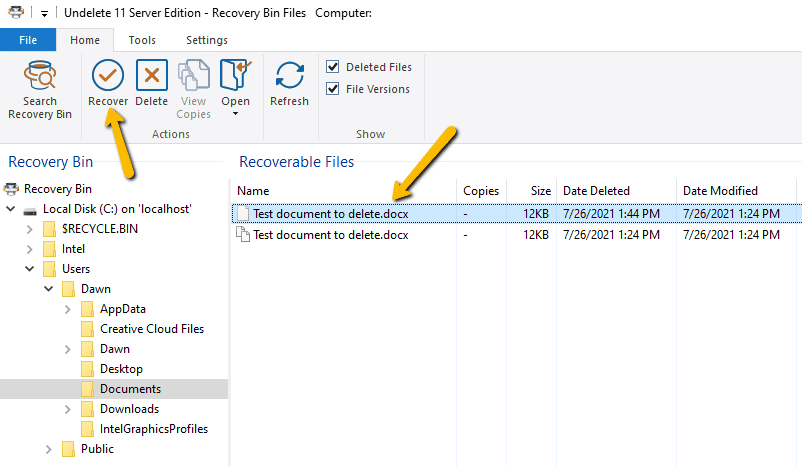
The Undelete Recovery Bin is similar to the Windows recycle bin. When a file is deleted it is automatically captured and stored in Undelete’s Recovery Bin, including files deleted or overwritten from shared network folders or deleted by the Windows command prompt. You can recover these “deleted” files in just a few clicks.
Undelete’s Recovery Bin differs from the recycle bin in several key ways:
- Undelete protects and recovers files deleted from network shares. In fact, it allows you to recover files deleted by any method, including Windows Explorer and other applications—even files deleted from the Windows command prompt.
- You can have a Recovery Bin for any individual disk volumes on your computer, or use a single, “common” Recovery Bin for all your disk volumes–even on Cloud Storage services such as Microsoft OneDrive.
- When files are “deleted” and moved by Undelete into the Recovery Bin, they are displayed in a manner very similar to Windows Explorer. You (or your users) can see and recover the deleted files and the folders as easily as browsing for “normal” files.
- The Undelete Server, Professional, and the Client component of Undelete let you to see the contents of the Recovery Bins on remote computers running Undelete Server Edition, allowing you or your users to recover “deleted” files across your network (typically from network file servers). This feature alone is a “life saver” for many System Administrators and Help Desk technicians. It’s no longer necessary to search backups or Windows shadow copies when a network user accidentally deletes a file from the file server.
“A network recycle bin is very important and Undelete Server has given us peace of mind knowing we can recover files quickly.” – Rafael Lemus, IT Director, R. Christopher Goodwin & Associates, Inc.
Backups and snapshots are a necessary part of any disaster recovery plan, but they are not a comprehensive solution for continuous data protection. Backups do not capture changes made since the last backup, so work performed during the time between backups is not recoverable or protected. Snapshots can fill some of the gaps between backups; however, scheduling constant snapshots and managing space utilization only adds to the sys admin’s workload.
Undelete is the ideal addition to your data protection strategy for instant recovery of network files—deleted or overwritten—continuous data protection, and allowing self-service recovery. Undelete is the real-time data protection solution to allow IT to focus on more productive projects.
Start Protecting Files in 3 Easy Steps
Undelete recovers deleted files instantly, eliminating time-consuming restores from backup. It’s easy and no reboot is required.

Download
Download the software from “Downloads” in My Account and save it to the Downloads folder.

Install
Double click the zipped file in the Downloads folder and follow the steps displayed. No reboot is required.
Add License Key
Launch Undelete, enter your key, and click apply. Customize settings as desired. Deleted files will now be saved to Recovery Bin for instant recovery.
“Bad things can happen and having your IT toolkit full to handle the accidents you never anticipated is smart. Undelete helps make sure that accidents aren’t fatal and can make your life a lot easier.” Rick Cadruvi, Condusiv Chief Architect
Videos
See Undelete in Action
Undelete Overview
Using Undelete to Recover Files from Network Shares
Undelete’s File Versioning
Undelete Features
50,000 customers globally use Undelete as a first line of defense before backup since Undelete provides true continuous data protection for easy recovery of individual files. Undelete 11 includes the following technologies:
Recovery Bin
The Recovery Bin catches all files no matter how they were deleted, allowing instant recovery with just a few clicks of the mouse. The Recovery Bin mimics the directory structure of your disk and includes a powerful search function, making it easy to find and recover files. Undelete adjusts the Recovery Bin to your volume’s available space, automatically protecting more files when free space is available and less data when it is not.
Easy to Use Interface
Easy to use, simple to navigate and intuitive – Familiar File Explorer-like interface makes finding and recovering deleted files even easier.
Enhanced File Version Recovery
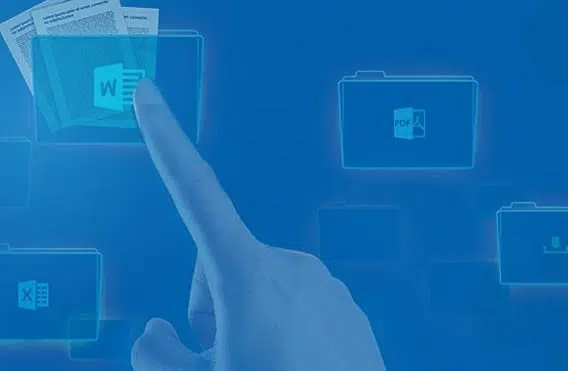
Undelete automatically captures previous versions of Microsoft Office files (Word, Excel, and PowerPoint), as well as custom file types (such as CAD, Photoshop files, PDFs and more) allowing fast and easy recovery of overwritten files.

Network File Protection
With Undelete Desktop Client or Pro Edition installed on network clients, your users can connect to the Undelete Server Edition Recovery Bins installed on the network file servers and restore their own deleted or overwritten files. NTFS security is fully supported.
Undelete Desktop Client Licenses
With the Undelete Desktop Client, users of computers attached to your servers can recover their own files directly from server Recovery Bins. Each Undelete Server license includes unlimited licenses of the Undelete Desktop Client at no additional cost.
Centralized Management
Undelete 11 delivers centralized management to easily extend your file recovery infrastructure across a distributed environment so your server and desktop data protection is easily managed from a central location. Efficiently manage your Windows systems through a single system.
Cloud Support
The Recovery Bin can be stored in the cloud using OneDrive and other popular file hosting services.
Secure Delete® Electronic File Shredder
With SecureDelete enabled, files that are purged from the recovery bin are overwritten with random data using a methodology developed for the National Security Agency. This popular feature introduces the ability to securely delete files immediately (as they are deleted). This along with the Wipe Free Space functionality that overwrites a volume’s free space (which may contain past remnants of confidential data) provides a complete solution of erasing secure data.
Full-Disclosure of Deleted Files
The Recovery Bin displays information about each deleted file including the file owner, the date and time the file was deleted, and the account used to delete the file.
Full Command Line Support
Major Undelete functionality also provided through the command line.

Dig Deeper Search
With Dig Deeper, you can search for and recover files deleted before Undelete was installed, provided they haven’t been overwritten. Undelete 11 will save you time with support by also recreating the original folder paths, making reorganizing your restored files a snap.
InvisiTasking® Technology
InvisiTasking allows for all background operations within Undelete to run with zero overhead. These tasks include, automatic purging of the Recovery Bin, moving files from one volume to another, securely overwriting free spaces using the automatic Wipe Free Space feature, and automatically adjusting the size of the enhanced Recovery Bin.
Extensive Browsing Functionality
Save time and recover the right file. Undelete supports previewing protected files in the Recovery Bin to find the exact one you want to restore. Undelete recovers deleted files instantly.
Operating Systems Supported
Windows Server 2022
Windows Server 2019
Windows Server 2016
Windows Server 2012, including R2
Windows Server 2008 R2
Windows 11
Windows 10
Windows 8
Windows 7
Disk Subsystems Supported
Extended Partitions
Logical Drives
Volume Sets
RAID Arrays (hardware and software)
Removable Disks (such as ZIP drives, Flash or Thumb Drives and Memory Cards)
File Systems Supported
NTFS File Systems
16/32-Bit FAT File System
Supports 64 bit Windows Operating Systems
Does not support 12-bit FAT file systems (12-bit FAT file system is used on FAT volumes smaller than 16 megabytes in size.).
Hardware Requirements
The disk space requirement for Undelete Server is about 350 MB. After installation is complete, Undelete occupies about 115 MB of disk space (No reboot required).
The disk space requirement for Undelete Desktop Clients is about 80MB. After installation is complete, Undelete occupies about 35 MB of disk space.
Undelete Recovers Deleted Files Instantly and Protects Servers & File Shares.
Choose the Undelete Plan that’s right for you.
Contact Sales for Enterprise, Government, Academic, or Site License Pricing.
* With the Undelete Client, users of computers attached to your servers can recover their own files directly from Server Recovery Bins.
Unconditional 30-day money-back guarantee.
Customers Depend on Undelete!
“I use Undelete to prevent accidental network deletions. These zero-day deletes are easily handled with your tool. When I have to use Undelete, it only takes minutes to perform a restore.” Gary White, Educational Service Center of Northeast Ohio
“I use Undelete on Windows File Servers. It’s a very big product. Every time users ask me for help because a document has “disappeared” from the network, I can quickly recover the document and inform them who it was that pressed delete!!!!” Massimo Ruggieri, Founder & CEO, Arcipelago IT
“Undelete is worth every penny! Easy to install, immediate protection of deleted files on file server, mirrors the folder structure so the deleted files are easy to find, retains a copy at every save operation so can provide the user with multiple file version options for restore, auto purge of saved copies after amount of time you specify. Invaluable to protect users from themselves, at a very reasonable price.” Tim Dasch, IT Management, Cooper Scully
“We do nightly backups across campus. However, most of our user servers also run Undelete so we can quickly recover files that were deleted in the past few weeks and sometimes restore previous versions of files which have become corrupted. Generally, Undelete is our first line of protection.” Mark Klopsch, Network Admin, College of Forestry at Oregon State University
“We use the Undelete on all of our file servers; it’s great for Windows and virtual systems. Undelete saves us countless hours on having to restore from backup. We are very happy as we use it almost weekly. The ability to save more than one version of a Word doc, or to prevent digging through backup logs for the right version of a file, definitely pays for itself.” Michael Downs, Alaska Department of Environmental Conservation
What People are Saying
“Typically, IT professionals respond to application performance issues by reactively buying more hardware. Without the luxury of a padded budget, we needed to find a way to improve performance on the hardware infrastructure we already have. It saved us from having to make a heavy investment in SSDs or do a complete rip and replace of our entire hardware infrastructure. To this day, I still can’t believe software is doing this.”
R. Ortiz, IT Manager, ASL Marketing
“I have used Diskeeper since it was first introduced. It has always worked well in keeping my drive defragged for the fastest response times for all of my apps. Thank you again for this fine piece of software.”
Philip Baldwin, NVQB
“The Undelete software that we use on all our Regional Servers is undoubtedly worth every penny. It
has saved our Techs numerous hours in restoring files inadvertently deleted as opposed to having to
restore from backup tape.”
Michael Lucas, Gancom (Division of Gannet Fleming)
“Undelete saves backup restores when someone accidentally deletes a file from a Windows share. We store tapes off site so Undelete can save a big delay for file restores of that type. Undelete does what it says on the box – really – and it works nicely as a network recycle bin.”
Glenn Edwards, Infrastructure Analyst, Itron
“I have been using Diskeeper for many years, it is installed as a routine on all servers, networked clients, SHO and any other computer. It has never presented any problem and has always demonstrated improved drive performance in both servers and clients. With each new release Condusiv does not merely provide “window dressing”, they actually improve the product with the objective of making it easier to use, more reliable, more effective and easier to use.”
Mark Sills, Systems Administrator / Manager, Home User